TotalAV reviewed: what the security suite really does, what it costs, and where the limits are
TotalAV is a consumer security suite for Windows, macOS, Android and iOS that bundles a malware scanner with a VPN, a password vault and a set of clean-up tools. This is a plain-language account of what is in the box, how the underlying technology works, what the subscription costs once the introductory term ends, and the several things the marketing around it tends to overstate.
Scope and honesty note. This is a research-based article, not a laboratory test. We have not run TotalAV through a controlled malware corpus and we do not publish a score, a star rating or a detection percentage, because we have not earned the right to one. Where a number matters, we point you at the organisation that actually measures it. Product details, prices and plan names change without notice: the vendor’s own current information prevails over anything written here in case of divergence.
What TotalAV actually is
TotalAV is sold as an all-in-one consumer security product rather than a bare antivirus. The scanner is the core, and around it the vendor packages the things that a typical household would otherwise buy separately or go without: a virtual private network, a password manager, a browser extension that blocks known-bad sites, and a set of maintenance utilities that clear caches, temporary files and duplicate downloads.
That bundling is the product’s real proposition, and it is a legitimate one. One subscription, one interface, one renewal date and one support contact is genuinely simpler than assembling four tools yourself. Whether it is the right purchase depends almost entirely on whether you will use the extras — a bundle you only half-use is more expensive than a scanner you use fully.
The operating company behind the brand, its registered details and its terms are set out on the vendor’s own legal pages. Those pages, not this one, are the authoritative source for who you are contracting with.
What your device already does for free
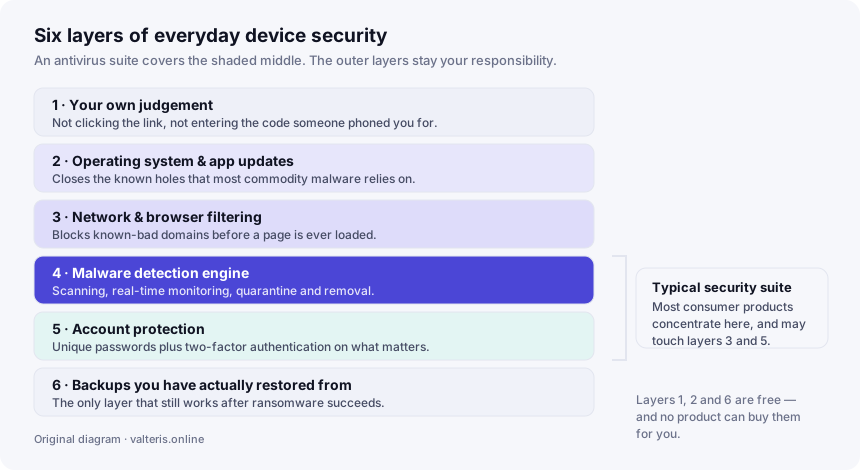
Any honest review of paid security software has to start here, because it is the comparison the marketing usually skips. Windows 10 and Windows 11 ship with Microsoft Defender Antivirus enabled by default at no extra cost. It is not a token feature: it is submitted to the same independent laboratories as the commercial suites and it is scored alongside them. macOS similarly ships with Gatekeeper, notarisation checks and the XProtect malware-signature mechanism built into the system. Android and iOS both run applications in sandboxes and screen their official app stores.
So the question is not “protected or unprotected”. It is whether a paid suite adds enough — in detection, in the bundled extras, in support you can actually reach, in the convenience of one dashboard — to justify a recurring bill. For some households it clearly does. For a careful user who already patches promptly and does not want a VPN or a password vault, it may not. Both answers are respectable, and any page that tells you only one of them exists is selling.
The one thing worth more than any of this. A current, tested backup held somewhere the live machine cannot write to. It is the only measure that still works after ransomware has already encrypted everything, and no antivirus product replaces it.
How detection really works
Antivirus marketing tends to present detection as a single magic capability. It is actually four different techniques with four different failure modes, and understanding them is what lets you read a lab report instead of a brochure.
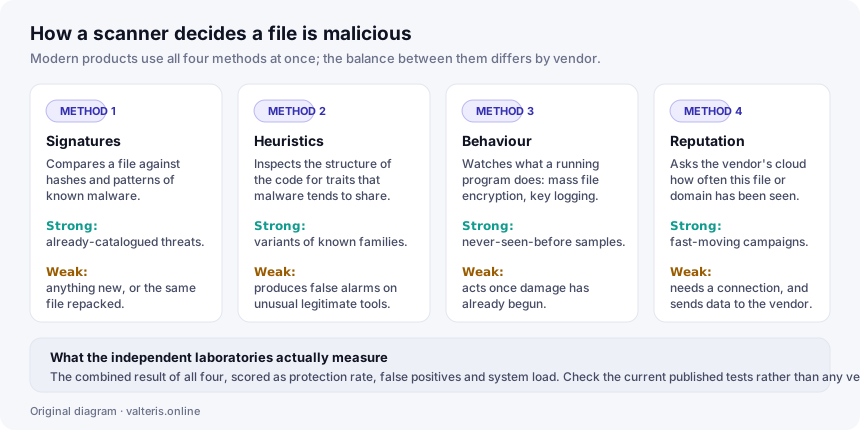
Signature matching compares files against a catalogue of known-bad hashes and byte patterns. It is cheap and precise, and it is useless against anything that has not been catalogued yet — including the same malware recompiled or repacked.
Heuristic analysis looks at the structure of code for the traits malware families share. It generalises past the catalogue, at the cost of occasionally flagging a legitimate but unusual program. That trade-off is why laboratories publish a false-positive count next to every protection score; a product that blocks everything, including your own tools, is not a good product.
Behavioural monitoring watches running processes for actions that have no innocent explanation — enumerating and encrypting documents at speed, logging keystrokes, injecting into other processes. This is the layer that stands a chance against something genuinely new. Its inherent limitation is timing: it acts once the behaviour has begun, so it is a containment mechanism as much as a prevention one.
Cloud reputation asks the vendor’s servers how often a file or domain has been seen elsewhere and how it behaved. It responds to fast-moving campaigns within minutes. It also means your device is telling the vendor about the files and sites it encounters, which is a privacy trade-off worth reading their policy about.
Every mainstream product, TotalAV included, uses all four. The differences between vendors are in the tuning and in the quality of the threat intelligence feeding them — which is precisely what independent testing measures and what no vendor’s own page can tell you.
Real-time protection versus the scan you start yourself
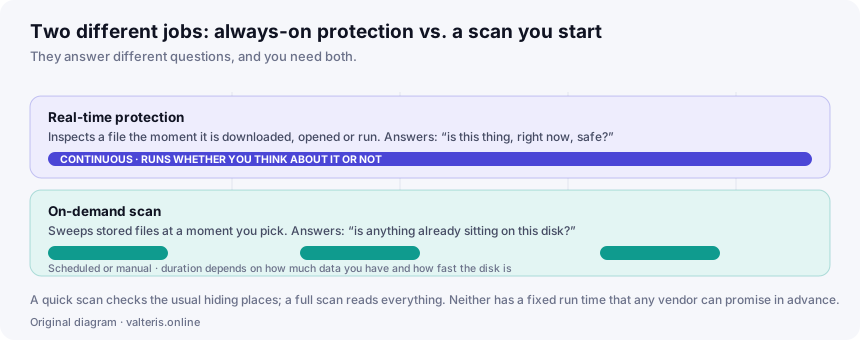
These are frequently conflated. They answer different questions and you want both.
The feature list, unpacked
The vendor lists the components below. We describe what each category does in general and, where we cannot verify a specific implementation detail, we say so rather than guess.
| Component | What it does | What to verify yourself |
|---|---|---|
| Malware engine | On-access and on-demand detection, quarantine and removal. | The current independent lab result for this specific product, not a badge from an unnamed source. |
| Web / browser shield | Blocks navigation to domains known for phishing or malware distribution. | Which browsers are supported on your platform; extension coverage differs. |
| VPN | Encrypts your traffic to an exit server, which is useful on networks you do not control. | Whether any data limit applies on your tier, and whether the no-logging claim has been independently audited. |
| Password manager | Generates, stores and fills credentials. | Which browsers and mobile platforms are supported, and how export works if you leave. |
| Clean-up utilities | Removes caches, temporary files, duplicate downloads and unused start-up entries. | Expect recovered disk space and a tidier start-up list — not a transformed machine. |
| Ad / tracker blocking | Suppresses advertising and tracking requests in the browser. | Whether it duplicates a blocker you already run; two can conflict. |
A word about the clean-up tools, because this is where consumer security products have historically overpromised as a category. Deleting caches and temporary files genuinely recovers disk space, and trimming start-up entries genuinely shortens boot time. Neither makes a processor faster. If a machine is slow because it has too little memory or a failing drive, no software utility fixes that, and you should be sceptical of any product implying otherwise — including this one, if it ever does.
Claims we removed from this page, and why
An earlier version of this article carried marketing copy that we could not stand behind. Rather than quietly delete it, we are listing it, because a reader who saw the old page deserves to know what changed. This is the corrections procedure described in our editorial policy, applied to ourselves.
| Previous wording | Why it is gone |
|---|---|
| “Millions of users have made it their go-to” | We have no verifiable user figure. An unsourced number is not evidence. |
| “A full scan finishes in minutes rather than the hour-plus competing products take” | An invented benchmark. Scan time depends on your data volume and drive speed, and we ran no comparative test. |
| “Fixes registry errors” | Registry cleaning has no demonstrated benefit for stability or speed and carries some risk. We do not present it as a feature. |
| “A single score out of 100 and one button that fixes everything” | A specific interface description we cannot verify. Software interfaces change. |
| “One subscription covers all the devices you own” | Plainly wrong and the most expensive error on the old page. Plans cover a specific number of devices, set by tier. |
| “No hidden tiers, no add-ons, no surprise renewal fees” | Multiple tiers exist and introductory subscriptions generally renew at a higher standard rate. See pricing. |
| “Built-in VPN with no data logs” | Restated as a vendor claim. We have seen no published independent audit of it. |
| “Shields banking sessions from keyloggers and screen-capture malware” | A specific technical guarantee we cannot substantiate. No product can promise that. |
| “Cancel anytime” | True but misleading on its own: cancellation has to happen before the renewal date, and cancelling does not by itself trigger a refund. |
| The “reader story” framing and the “reader-submitted” label | No reader submitted anything. It was a device to borrow the credibility of a testimonial. Removed entirely. |
| “An in-depth, unbiased look” | The page is commission-funded. Calling it unbiased while being paid on conversions is not a description we are entitled to. |
Pricing, renewal and your rights as an EU consumer
We do not quote prices, because they change constantly and a stale figure on an affiliate-funded page is worse than no figure at all. What is stable is the shape of the offer, and that is what usually catches people out.
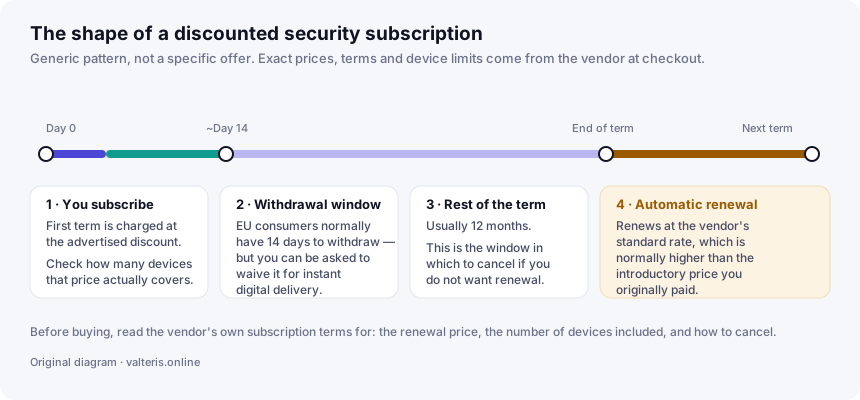
Introductory versus standard pricing. Heavily discounted first-year pricing is the norm across the whole consumer security category. The discount attaches to the first term. Renewal is at the standard rate. Before subscribing, find the renewal price in the vendor’s own terms and decide whether you would pay that.
Device counts. The number of devices covered is set by the tier. Count your laptops, phones and tablets before choosing, not after.
Your statutory withdrawal right. Under the EU Consumer Rights Directive (2011/83/EU), a consumer buying at a distance generally has 14 days to withdraw without giving a reason. There is an important carve-out for digital content supplied immediately: the trader may ask for your express consent to begin supply at once together with your acknowledgement that you thereby lose the withdrawal right. Software vendors routinely ask for exactly that at checkout, so read the box you are ticking.
The vendor’s own guarantee. Separately from the statutory right, security vendors commonly advertise a money-back guarantee of their own. Its length and its conditions are contractual, so they are whatever the vendor’s refund policy currently says. Read it before you need it.
Cancelling. Cancellation stops the next renewal; it is not itself a refund request. If you want both, do both, and keep the confirmation.
Who it suits — and who it does not
A reasonable fit
Households with several devices and mixed confidence levels, where one subscription and one dashboard is worth paying for, and where the VPN and the password vault will genuinely be used.
Also reasonable
Anyone who wants a support channel with a human at the end of it when something goes wrong, rather than a community forum.
Probably not worth it
A careful single user on an up-to-date Windows or macOS machine who already runs a password manager and has no use for a VPN. Defender plus discipline plus backups is a defensible position.
Definitely look elsewhere
If an audited no-log VPN is your main reason to buy, choose a VPN on its own audit record. A bundled VPN is a convenience, not a specialist tool.
The scam that uses this product’s name
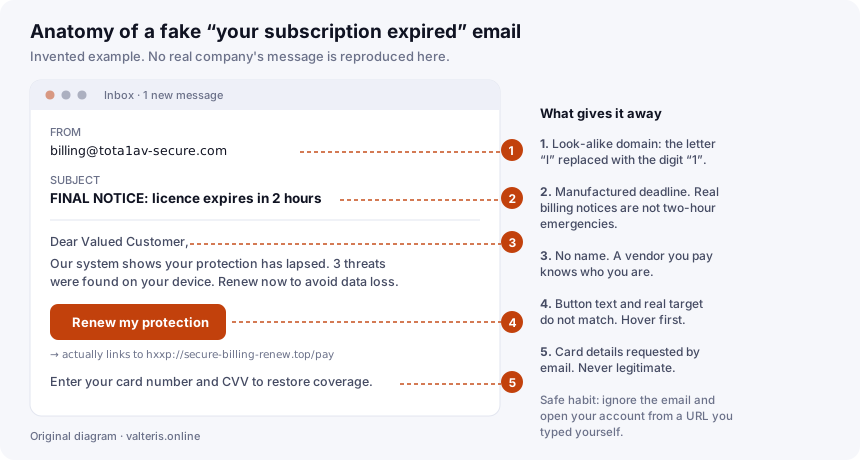
Security brands attract impersonation, and TotalAV is no exception. The pattern is a fake “your licence has expired” email or a web pop-up claiming to have found infections on your device. Neither is real: a web page cannot scan your disk, and a vendor you pay does not address you as “Valued Customer”.
Our verdict
TotalAV is a competently assembled consumer bundle that solves a real problem: most people do not want to choose and maintain four separate security tools. If you will use the bundle, the convenience is worth something, and paying for support you can reach is a legitimate reason to buy software.
What we will not tell you is that it is the best antivirus available, because we have not tested it against its competitors and nobody should take that claim from a page that is paid on conversions. Nor will we tell you that you are unprotected without it, because on a current Windows or macOS system you are not.
Buy it if the bundle fits your household and you have checked the renewal price and the device count. Skip it if you already have those bases covered. Either way, check the current independent laboratory results first — they are free, and they are the only part of this decision that nobody is paid to tell you.
Questions and answers
Is TotalAV free?
There is a free tier and there are paid tiers. The free tier is limited; the features most people associate with the brand — real-time protection, the VPN, the password vault, the tune-up tools — sit behind a paid subscription. Treat “free” in any advertisement as referring to the limited tier unless the page says otherwise.
Will it slow my computer down?
Any real-time scanner costs some CPU and disk throughput; the honest question is how much. That is exactly what the independent laboratories measure under a “performance” or “system impact” heading. We have not run our own benchmark, so we do not publish a number. Check the current AV-TEST or AV-Comparatives performance round before you buy.
How many devices does one subscription cover?
A limited number, set by the tier you buy — not “all your devices”. The device count is stated at checkout and it is the single most common source of surprise. Count your machines first, then pick the tier.
Does the subscription renew automatically?
Assume yes. Discounted security subscriptions are normally sold as an introductory first term that renews automatically at the vendor’s standard rate, which is usually higher. If you do not want that, cancel before the renewal date rather than after.
Can I get my money back?
Two separate things may apply. The vendor advertises its own money-back guarantee — read its refund terms for the length and the conditions. Separately, EU and EEA consumers have a statutory 14-day right of withdrawal on distance contracts, although for digital content supplied immediately you can be asked to waive it at checkout. Check which of the two you are relying on.
Is the bundled VPN a real, audited no-log VPN?
The vendor states that it does not log your browsing. We have not seen a published independent audit of that claim, and a no-log claim without an audit is a promise rather than a demonstrated fact. If a strictly audited VPN is your reason for buying, verify the current audit status before you subscribe.
Do I need it if I already run Windows?
Windows 10 and 11 include Microsoft Defender Antivirus at no extra cost, and it is a real product that the independent labs test alongside the commercial suites. Buying a third-party suite is a reasonable choice, but it should be a choice about the extra features and the support, not a rescue from having no protection at all.
Sources and further reading
We link to primary sources so you can check us. The independent test laboratories below are the standard references for detection and performance results; we have no commercial relationship with any of them and we earn nothing from these links.
- TotalAV — the vendor’s own site: current plans, device limits, subscription terms, refund policy and privacy policy. Authoritative for anything commercial.
- AV-TEST Institute — independent comparative testing of protection, performance and usability.
- AV-Comparatives — independent real-world protection and false-positive testing.
- Microsoft Defender Antivirus documentation — on the protection already included with Windows.
- Apple Platform Security guide — on Gatekeeper, notarisation and XProtect in macOS.
- Directive 2011/83/EU on consumer rights — the statutory right of withdrawal and the digital-content exception.
- ENISA — the EU Agency for Cybersecurity, for threat-landscape reporting.
Precedence. Plans, prices, device limits, feature availability and contractual terms are set by the vendor and change without notice. Where anything on this page diverges from the vendor’s own current information, the vendor’s information prevails. Spotted an error? Write to info@valteris.online and we will correct it or explain why we disagree.
Trademarks. TotalAV is a trademark of its respective owner. valteris.online and DER MONEY s.r.o. are independent and are not affiliated with, endorsed by or sponsored by TotalAV or its operating company. The name is used for identification and commentary only.
All illustrations on this page are original SVG diagrams created by valteris.online for this article. No product screenshots, vendor artwork or stock photography are used anywhere on this site.