How to choose antivirus software without being sold to
A vendor-neutral checklist for buying — or deliberately not buying — consumer security software in the EU. Written to be useful even if you close this page and buy nothing.
Start by establishing what you already have
Before comparing products, find out what is protecting the machine right now. On Windows 10 and 11, Microsoft Defender Antivirus is built in and switched on by default. On macOS, Gatekeeper, app notarisation and the XProtect signature mechanism are part of the operating system. On Android and iOS, applications run sandboxed and the official stores are screened. None of this is marketing from us — it is documented by the platform vendors themselves, and we link to that documentation at the bottom of this page.
This matters because the strongest sales pitch in the category is the implication that you are currently naked. You are not. The real decision is narrower and more honest: does a paid suite add enough to be worth a recurring bill?
The checklist
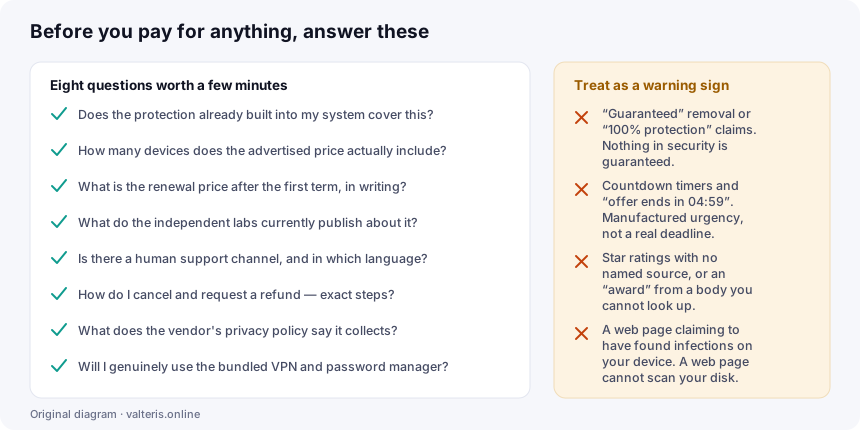
1. Does the built-in protection already cover you?
If you patch promptly, do not install software from random sources, and already use a password manager, the marginal gain from a paid suite is smaller than the advertising suggests. That is a legitimate conclusion, and no one is paid to tell you it.
2. How many devices does the advertised price actually cover?
This is the single most common unpleasant surprise. “Protect your devices” in a headline usually means a specific number set by the tier. Count your laptops, phones and tablets first, then read the device limit at checkout.
3. What is the renewal price?
Discounted first-year pricing is the category norm. The discount applies to the first term; renewal is at the standard rate. Find that figure in the vendor’s terms and ask yourself whether you would pay it. If you would not, either set a calendar reminder to cancel or do not start.
4. What do the independent laboratories currently publish?
AV-TEST and AV-Comparatives run structured comparative tests and publish protection rates, false-positive counts and system-impact figures. Read the current round rather than a badge on a marketing page, and note whether the product you are considering appears in it at all — participation varies, and a product absent from a round has no independent result for that round.
Read the false-positive column too. A scanner that blocks everything, including your own legitimate tools, is not a well-tuned scanner.
5. Can you reach a human?
Support is a large part of what separates a paid suite from free built-in protection. Check the channel, the hours and the language before you need them, not after.
6. What is the exact route to a refund?
Two different things may be available to you. The vendor’s own money-back guarantee is contractual: its length and conditions are whatever the refund policy says. Separately, EU and EEA consumers generally have a 14-day statutory right of withdrawal on distance contracts under Directive 2011/83/EU — though for digital content supplied immediately, the trader may ask for your express consent to start at once and your acknowledgement that you lose the withdrawal right. Read the checkbox.
7. What does the vendor collect?
Security software sits at a deep level of your system and cloud-reputation features work by sending information about files and domains to the vendor. That is a reasonable design; it is also a privacy trade-off. The vendor’s privacy policy is the document that tells you the terms of it.
8. Will you actually use the bundle?
A suite is good value when the VPN, the password manager and the clean-up tools replace things you would otherwise pay for or go without. If you will only ever use the scanner, you are paying for a bundle to use one component of it.
Four things that should make you close the tab
- Guarantees. “100% protection” and “guaranteed removal” are not claims any security vendor can honestly make. Detection rates are high; they are never one hundred per cent.
- Countdown timers. An offer that expires in four minutes and fifty-nine seconds, and then resets when you reload, is manufactured urgency. It tells you something about the seller.
- Ratings with no named source. Five stars from “our reviewers” or an award from a body you cannot look up is decoration, not evidence.
- A web page claiming to have scanned your device. It has not. A web page cannot read your disk. Any page telling you it found infections is either a scam or a deliberately deceptive advertisement.
Free things that outperform paid things
Ranked roughly by how much risk they remove per hour of effort:
- Automatic updates, everywhere. Most commodity malware exploits holes that were patched months earlier.
- A backup you have tested. Held somewhere the live machine cannot write to. This is the only measure that still helps after ransomware succeeds.
- Two-factor authentication on email first, then banking, then everything else. Your email account is the reset route to all the others.
- Unique passwords from any password manager, including the free ones built into browsers.
- A moment of suspicion before acting on any message that creates urgency about money or access.
So should you buy one?
Sometimes, yes. A household with several devices and mixed levels of confidence gets real value from one subscription, one dashboard and one support number. Someone who wants a VPN and a password manager anyway may find the bundle cheaper than the parts. Someone who would rather pay than think about it is making a rational purchase.
Just buy it for what it actually is — convenience, bundling and support — rather than because a page implied you were defenceless without it.
Sources
- AV-TEST Institute
- AV-Comparatives
- Microsoft Defender Antivirus documentation
- Apple Platform Security guide
- Directive 2011/83/EU on consumer rights
- ENISA — EU Agency for Cybersecurity
The illustration on this page is an original SVG diagram created by valteris.online. Product and company names mentioned are trademarks of their respective owners; this site is independent of all of them.